

Review of the Lenovo ThinkPad X1 Yoga (3rd Gen) ultrabook. Cool and expensive
13.07.18 11,545
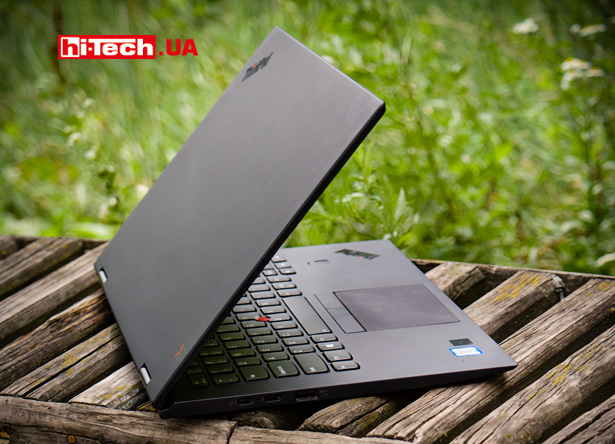
Lenovo ThinkPad X1 Yoga (3rd Gen)
For Lenovo, the 2018 ThinkPad X1 Yoga ultrabook is already the third generation of this model. To avoid confusion, the manufacturer even indicates the corresponding generation in the name. The device presented for testing is called Lenovo ThinkPad X1 Yoga (3rd Gen).
Without going into deep details, the main difference between the Lenovo ThinkPad X1 Yoga (3rd Gen) and its predecessor (2nd Gen) is the transition to eighth-generation Intel Core processors.
What is theLenovoThinkPadX1Yoga?
By positioning Lenovo ThinkPad X1 Yoga (3rd Gen) is at the very top of the Lenovo ThinkPad line. This is a premium ultra-compact convertible laptop (“2-in-1”) that can work both as a classic laptop and as a tablet.
It is intended mainly for business and corporate use.
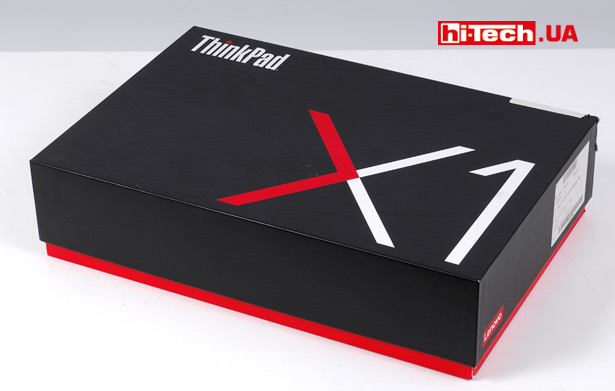
Its screen has a diagonal of 14”, which ensures comfortable work. At the same time, small dimensions and light weight are maintained.
But it should be noted that there are many more compact models with similar characteristics on the market today.
The relatively large size of the Lenovo ThinkPad X1 Yoga can be explained by the compliance of this model with numerous increased requirements regarding reliability, durability and endurance. Like many other high-end ThinkPad laptops, the ThinkPad X1 Yoga is designed to operate in a wide temperature range, with stand liquid spills on the keyboard, and has a rugged design of the case, hinges, etc.
The Lenovo ThinkPad X1 Yoga is similar in many ways to its brother, the ThinkPad X1 Carbon, but while the X1 Carbon is a classic laptop, the X1 Yoga is a convertible laptop.
Transforming
For those who are familiar with Lenovo laptops, the Yoga prefix in the name will immediately indicate that the ThinkPad X1 Yoga screen is rotatable. The design allows for several modes of use at once: classic laptop, “tent”, “stand” (L-shaped position), and tablet.
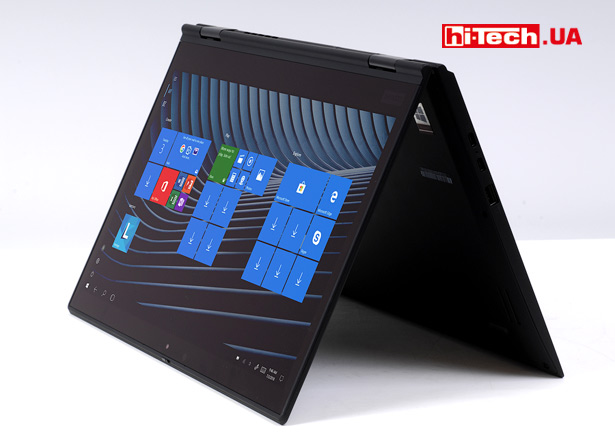
Tent mode
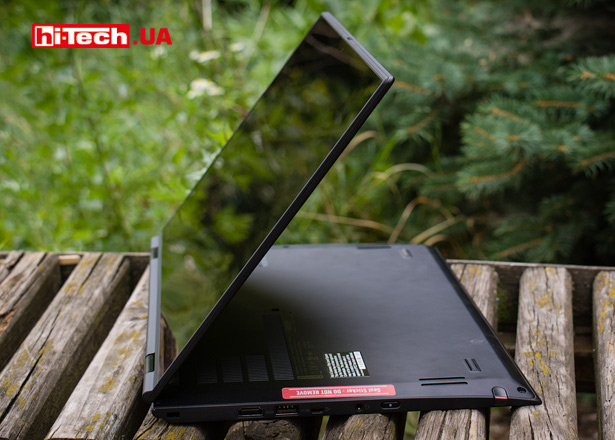
Stand mode
It is curious that when you rotate the screen, the buttons on the keyboard automatically retract and lock. This is done to make the device more comfortable to use while providing a flat surface.
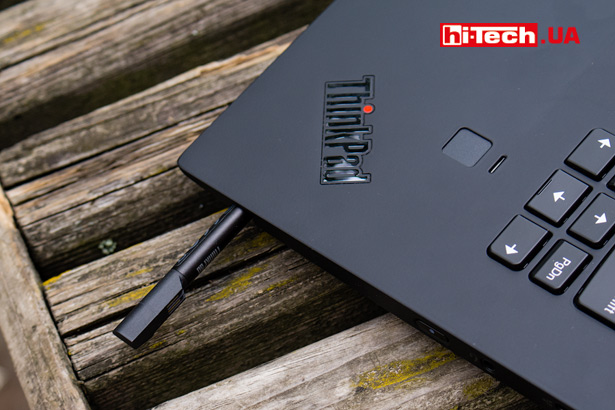
The ThinkPad X1 Yoga case provides a seat for a very advanced proprietary stylus, the ThinkPad Active Pen (not available in all versions). It can be useful for more convenient control of the device in tablet mode, but due to its special characteristics, it is also suitable for taking notes, drawing, etc.
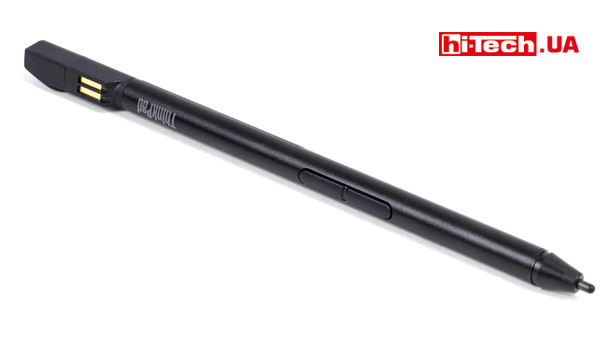
ThinkPad Active Pen
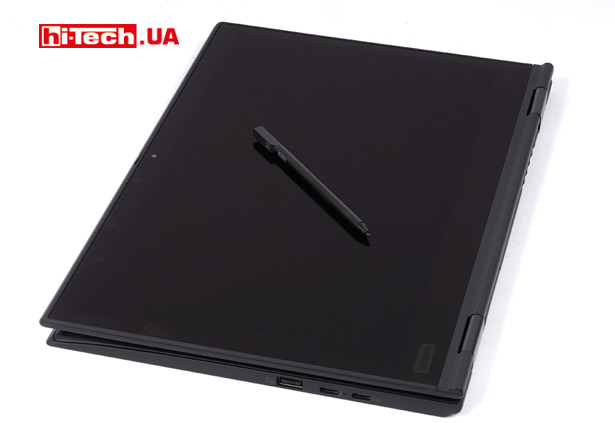

ThinkPad Active Pen settings
Without changing traditions
Despite the hybrid nature of the Lenovo ThinkPad X1 Yoga, its appearance is easily recognizable as a traditional ThinkPad style.
While some may find the X1 Yoga’s austere design boring, others will find it an advantage.
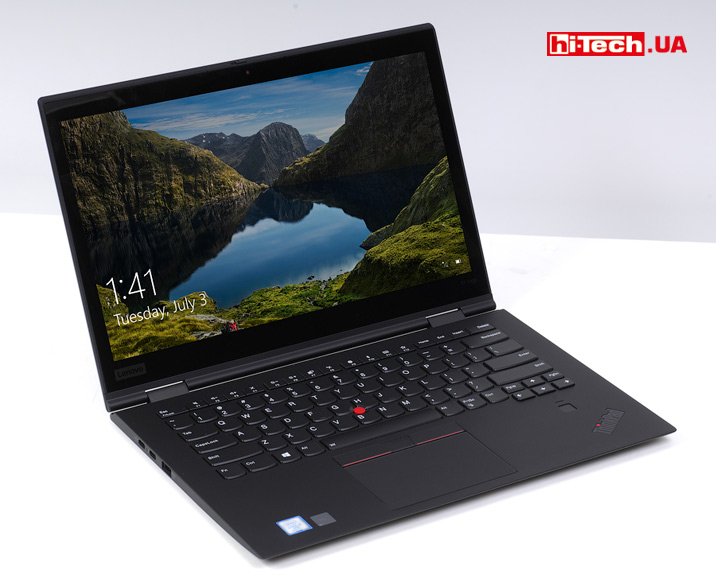
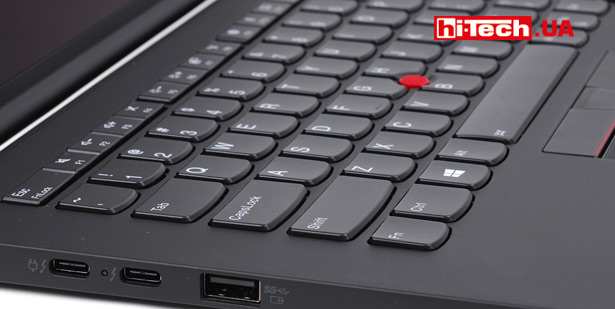
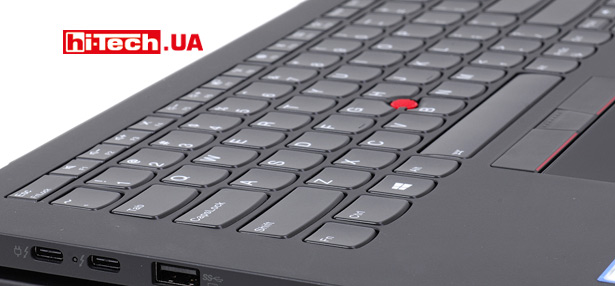
The case has a soft-touch coating. In the center of the keyboard is the proprietary TrackPoint manipulator (red dot), complemented by a pair of separate buttons above the touchpad.
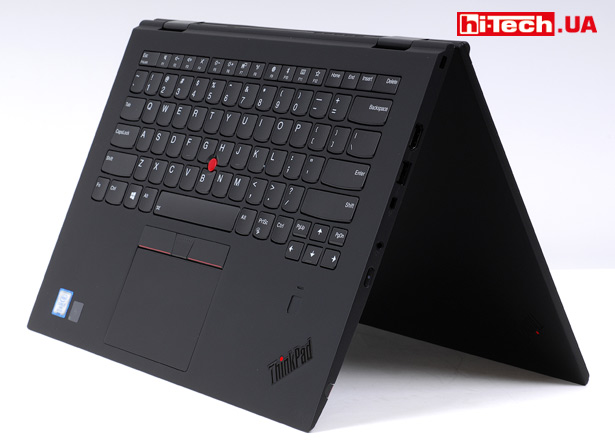
Many modern laptops have the sin of having a power button right in the corner of the keyboard, but this button is located separately on the side.
The Fn button, again traditionally for ThinkPads, is located to the left of Ctrl. But, if you are used to the fact that the bottom left key should be Ctrl, then the values of Fn and Ctrl can be swapped in a special application or in the BIOS.

I liked that in various parts of the case and on some keyboard buttons there are special light information indicators (power mode, charging indication, activated Caps Lock, camera activity, muted microphone, etc.).
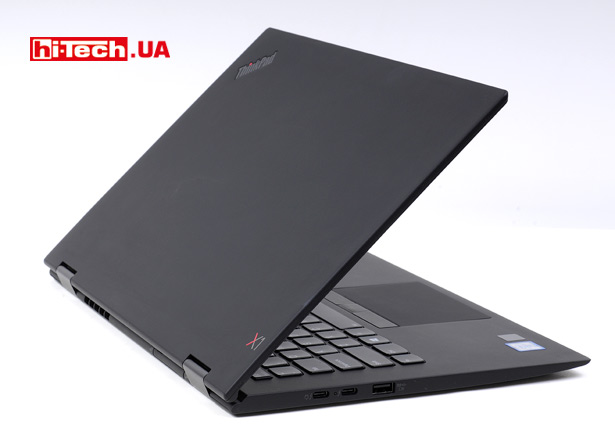
In the Think logo on the lid, the red dot is an indicator light showing what state the laptop is in (off, sleeping, running, etc.)
Equipment
The Lenovo ThinkPad X1 Yoga has a single screen diagonal option – 14”.
But the screen characteristics may differ slightly. The simplest is an IPS panel with a resolution of 1920×1080 pixels, followed by an IPS panel with a resolution of (2560×1440 pixels). A the most advanced is an IPS panel with a resolution of 2560×1440 pixels, increased brightness to 500 cd/m2 and HDR support!
By the way, the maximum brightness value of 500 cd/m2 for a laptop can be called very high.
It was with this very powerful screen that the Lenovo ThinkPad X1 Yoga presented in our test turned out to be.
The laptop is built on the eighth generation Intel Core U series processors. Depending on the modification, Intel Core i5-8250U, i5-8350U, i7-8550U and i7-8650U CPUs can be used. These are energy efficient processors with a TDP of 15 W.
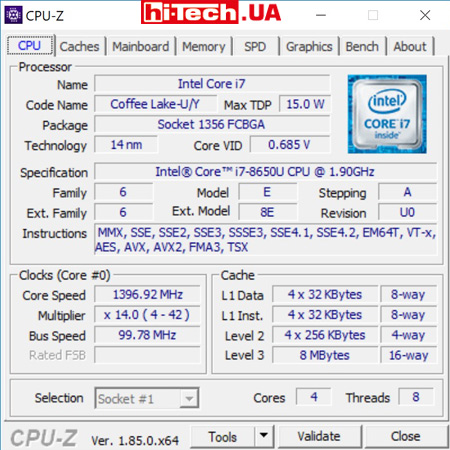
Characteristics of the installed Intel Core i7-8650U processor
A notable feature of the eighth generation processors of this series is the number of computing cores increased from two to four compared to their predecessors.
Our ThinkPad X1 Yoga is equipped with an Intel Core i7-8650U CPU.
Video adapter built into the processor. In this case, it is Intel UHD Graphics 620. There are no options with discrete video.
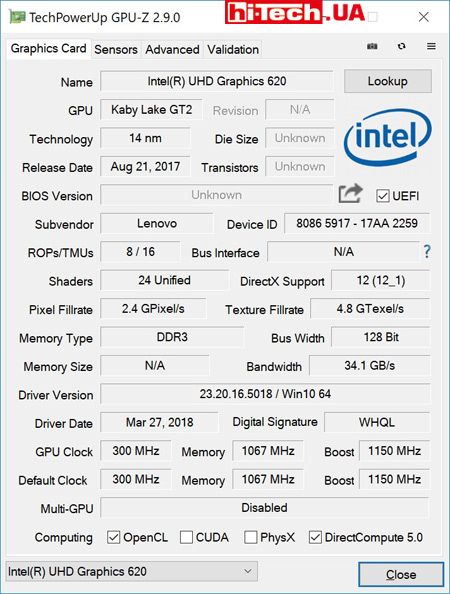
Characteristics of the integrated video adapter Intel UHD Graphics 620
The RAM capacity can be 8 or 16 GB. In both cases it is LPDDR3 2133 MHz memory. Storage: SSD from 128 GB to 1 TB.
The Lenovo ThinkPad X1 Yoga presented in the test is equipped with a memory configuration of 16 (RAM) + 512 GB (storage).
Ultra-compact laptops often have a fairly limited selection of ports, but this is not the case with the ThinkPad X1 Yoga. The range of different connectors is very rich.
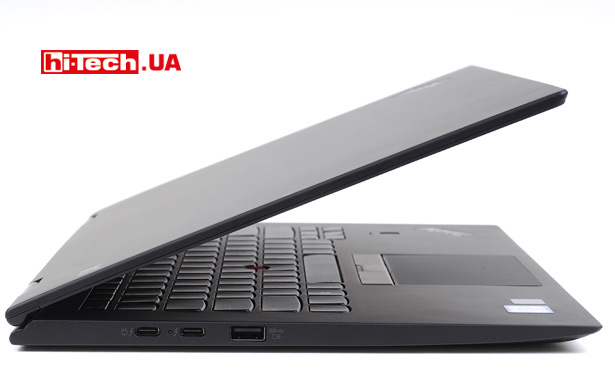
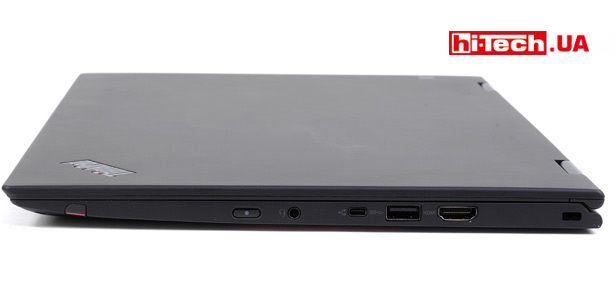
Please note that both USB Type-C ports support Thunderbolt 3. This, if desired, will allow you to connect monitors, external video cards and many other complex devices.
There is also a full-size HDMI port. By the way, if you need to connect an old projector or other display device with a VGA video input, a special HDMI-VGA adapter is included with the ThinkPad X1 Yoga.
The SIM card slot and card reader are hidden under a single flap on the edge next to the screen mount. By the way, full-size SD memory cards are not supported, only MicroSD.
A fingerprint sensor is available for biometric identification. Some modifications include infrared cameras to identify the user by face.
The webcam is quite simple, but there is a nice innovation. If desired, it can be closed with a special built-in curtain. More and more people today tape up their cameras for fear of surveillance; with the new ThinkPad X1 Yoga there will be no such need.
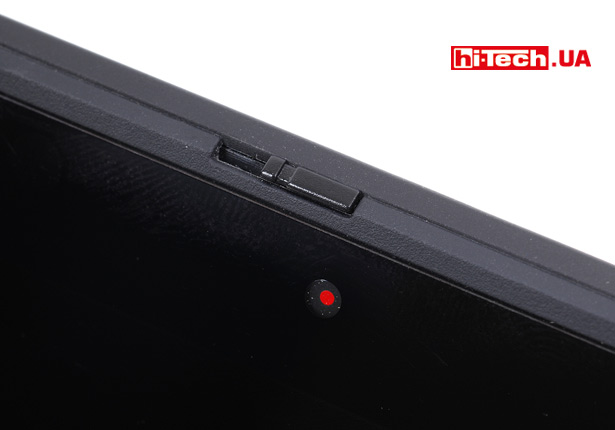
The webcam can be mechanically closed with a built-in shutter
Wi-Fi antenna is double. The microphone system is designed, among other things, to control voice assistants from a distance. This is the trend in laptops today.
Performance, heating and battery life
The very powerful processor used here, combined with a fast SSD and a good amount of RAM, ensured very fast, comfortable operation of the device.
For any office, business, or home tasks, unless it is some very advanced work with video content, the laptop is just perfect.
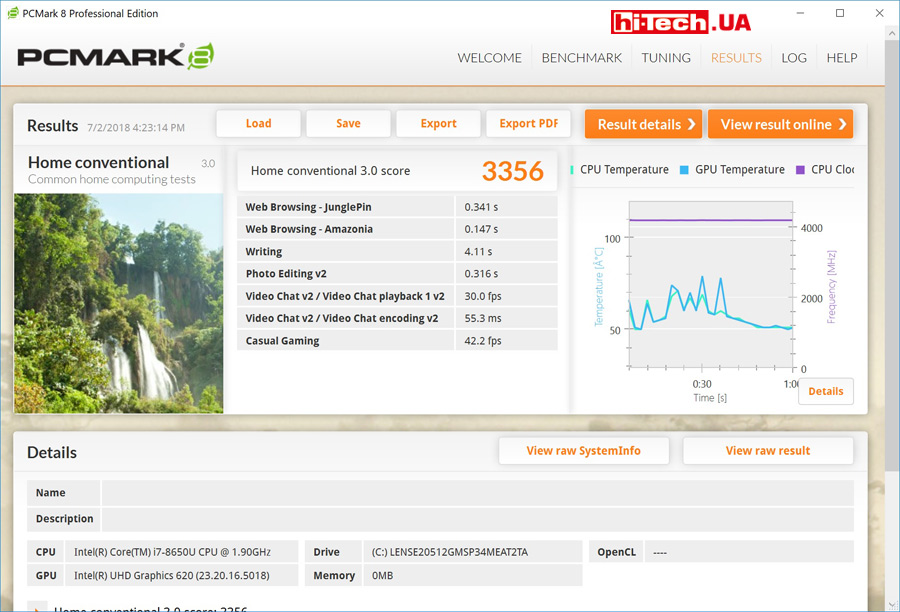
PCMark 8 Home Performance Score
The use of built-in video in laptops of this class (ultra-compact) is very common.
Yes, the integrated video capabilities of the Intel UHD Graphics 620 are limited for gaming. Any decent level of performance in modern games can only be achieved using a lower resolution in combination with modest rendering settings. But the ThinkPad X1 Yoga is not intended for this.
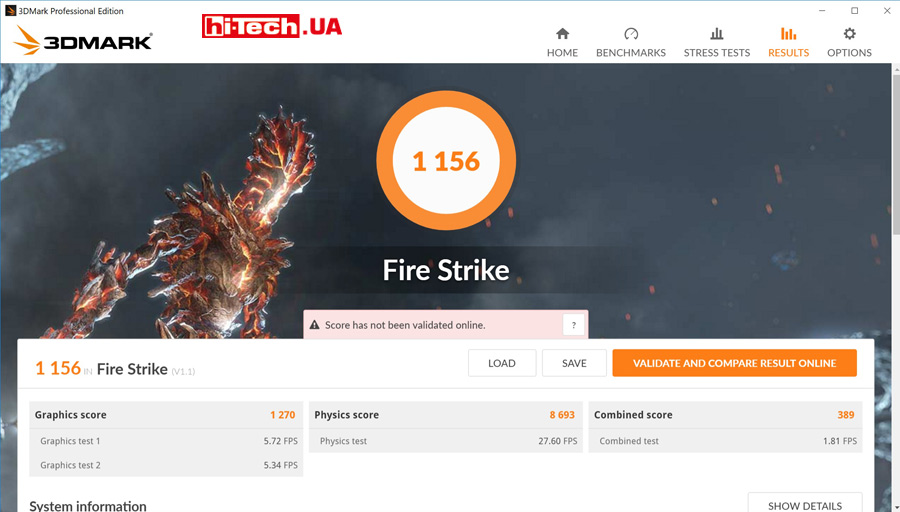
3DMark Fire Strike Gaming Benchmark Performance
But the built-in video is very economical in terms of power consumption, heat dissipation and does not require any particularly powerful cooling system, which cannot be placed in the compact case of laptops of this class.
At the same time, Intel UHD Graphics 620 will easily provide 4K video playback and allow you to connect, if necessary, several additional monitors to the laptop at once.
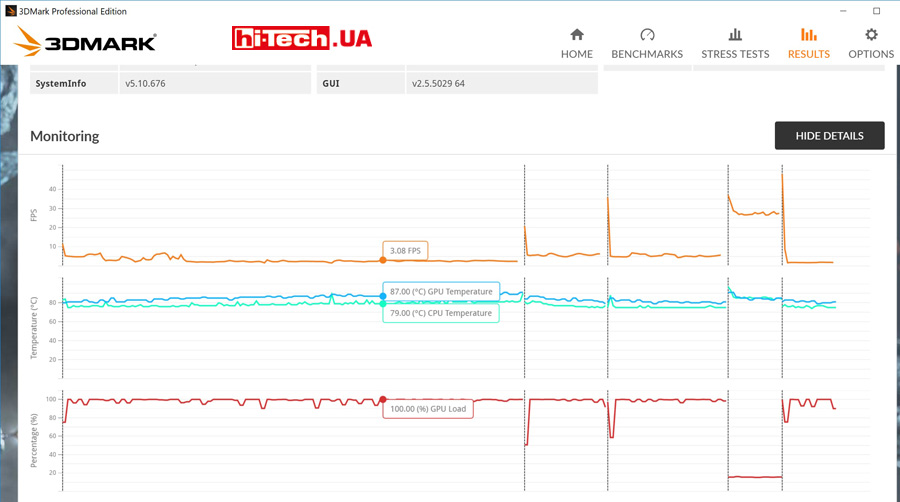
CPU and GPU temperatures under high load (3DMark Fire Strike test)
At maximum computing load, CPU and GPU temperatures can easily reach or exceed 80 C. Quite a high level, but for ultra-compact laptops this is acceptable.
At the same time, the keyboard itself heats up moderately, but the bottom panel of the device gets quite hot. Holding a laptop on your lap will be uncomfortable.
If the load is very light, the cooling fan seems to stop completely and the X1 Yoga runs silently.
At high load levels, the fan operation, of course, becomes noticeable, but the ThinkPad X1 Yoga cannot be called noisy. Compared to gaming laptops, it can even be called quiet.
The built-in battery of the Lenovo ThinkPad X1 Yoga (3rd Gen) turned out to be quite capacious – 54 Wh.
In the PCMark 8 Home test, which is a moderate, although not the lightest, load, with the screen at moderate brightness and the Wi-Fi adapter turned on, the ThinkPad X1 Yoga lasted five hours. Previously, we were in the same test we checked the Lenovo Yoga 920, which managed to work for 5 hours 33 m. We assume that if our Lenovo ThinkPad X1 Yoga was equipped with a simpler screen with Full HD resolution, the battery life would be slightly higher.
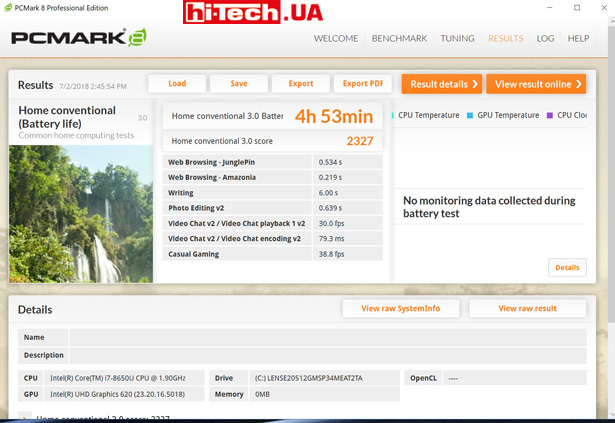
Battery life under load with PCMark 8 Home test
With a lighter load (web browsing, video playback), you can count on a battery life of about 10 hours.
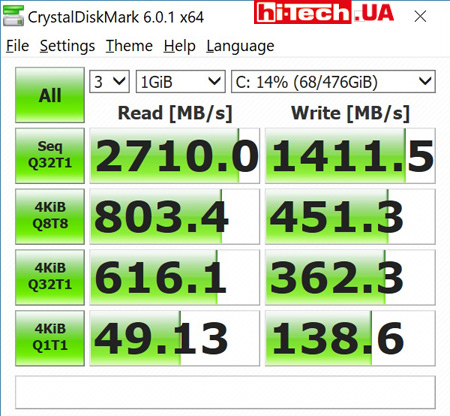
The built-in SSD disk was able to achieve such high read and write speeds thanks to the use of the PCIe bus (CrystalDiskMark test)
Thanks to the fairly powerful included power supply, the Lenovo ThinkPad X1 Yoga (3rd Gen) can reach 80% in just one hour (claimed). This can come in handy when traveling, when there is situational access to a free outlet, you can significantly increase the battery’s energy reserves in a short time.
Impressions and conclusions
When using the Lenovo ThinkPad X1 Yoga (3rd Gen), you never lost the feeling that you were working with a well-honed tool for serious work. The convenience of the keyboard and touchpad is nothing short of praiseworthy.
I was very pleased with the screen. You won’t surprise anyone with good viewing angles in premium laptops, but this is the first time we’ve seen such brightness in laptops. And even though the relevance of HDR is still low, increased brightness is very useful, for example, when using the device outdoors during the day.
But the performance of the built-in speakers was not impressive. Even with such a small case size, manufacturers sometimes manage to achieve better results.
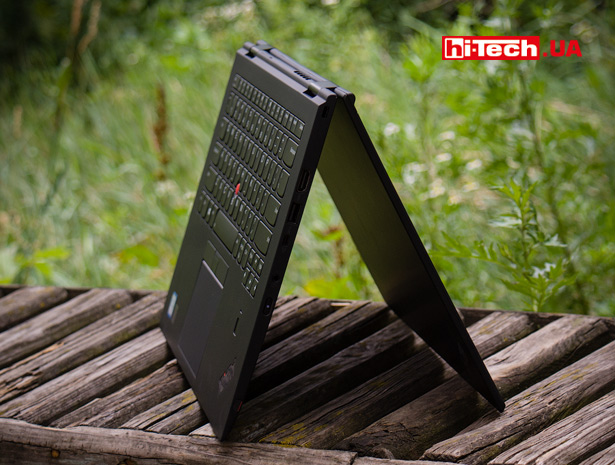
The level of components used (processor, memory, storage, etc.) fully corresponds to the high class of this device.
The device is undoubtedly cool, but it is difficult to recommend for ordinary users.
It is not as compact as some competitors and does not stand out with its spectacular appearance. And most importantly, this is a very expensive device.
The cost of Lenovo ThinkPad X1 Yoga (3rd Gen) starts at approximately 58,000 UAH ($2,200). A modification similar to the one presented in our test will cost about 73,000 UAH ($2,750).
The high cost of the Lenovo ThinkPad X1 Yoga is explained by the presence of a number of features aimed at professional use. This applies to both design features and software and hardware solutions related to reliability and safety.
Lenovo ThinkPad X1 Yoga (3rd Gen) Features
| Screen | 14”, IPS, 2560 x 1440 pixels. touch, HDR |
| Maximum screen brightness | 500 cd/m2 |
| Processor | Intel Core i7-8650U |
| Video | Intel UHD Graphics 620 (built-in processor) |
| RAM size | 16 GB |
| Storage | SSD PCIe 512 GB |
| Network interface wired/wireless (Wi-Fi) | no/802.11 AC |
| Bluetooth | yes (4.1) |
| USB connectors | 2xUSB Type-C (with Thunderbolt 3 support), 2xUSB 3.1 |
| Card reader | microSD |
| Video outputs | HDMI |
| Battery | 54 Wh |
| Additional features | Tablet mode, ThinkPad Active Pen stylus included, modem, HDMI-VGA adapter |
| Dimensions | 333×229×17 mm |
| Weight | 1.4 kg |
| Supplier | Lenovo representative |
| Price | from $2200 |
Rating:
+ cool screen with high maximum brightness
+ good level of performance
+ fast storage
+ webcam curtain
+ interesting stylus ThinkPad Active Pen
+ comfortable keyboard
+ increased reliability, strength, endurance (according to the manufacturer)
- high price
- not the most compact size for its class
- inexpressive design
See also:

Don't miss interesting news
Subscribe to our channels and read announcements of high-tech news, tes





Samsung Galaxy Fold7: not a smartphone, not a tablet, something more
 0
0 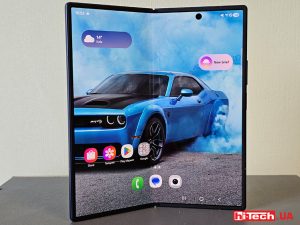
Samsung Galaxy Fold series of smartphones is notable for its folding design and large display. The new generation model had an even larger screen, advanced cameras, stronger hardware and improved ergonomics.
NVIDIA Blackwell – architecture with new capabilities for AI and content creation
0 
NVIDIA technologies that were previously only available to owners of professional graphics cards are now open to ordinary users. Let’s talk about the capabilities of the Blackwell architecture in the field of artificial intelligence and content creation.
Garmin Instinct Crossover – hybrid smartwatch costs $600 with AMOLED screen, flashlight and sapphire glass smart watches

Garmin Instinct Crossover has a 1.2-inch AMOLED display with RevoDrive analog hands covered with Super-LumiNova luminescent compound.
New EcoFlow with 288 Wh capacity weigh less than 3 kilograms accumulator

EcoFlow has introduced a new line of portable charging stations in Europe, the Trail series. This device has already been on sale in the US